> ## Documentation Index
> Fetch the complete documentation index at: https://docs.dentolize.com/llms.txt
> Use this file to discover all available pages before exploring further.
# Salaries
> How much each doctor and user earned in a period, from their percentages, salary, bonuses and deductions.
Go to **Analytics → Salaries** and choose the dates (a full month to include the base salary):
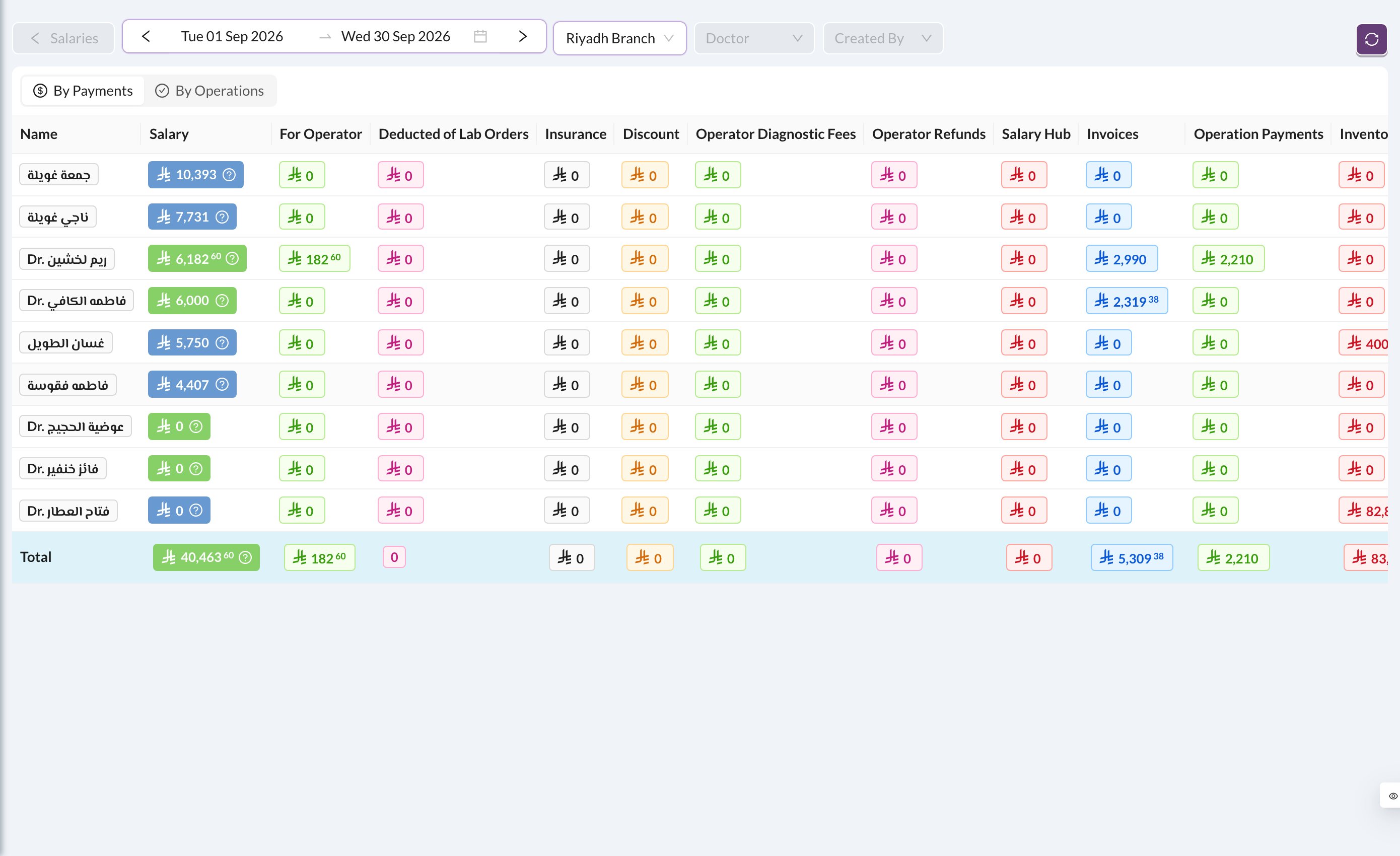 Each row is a user. **Salary** is the total they earned:
> **Salary** = For Operator + Operator Diagnostic Fees + base salary + bonuses − lab order deductions − operator refunds − debts − deductions
* **For Operator:** the doctor's percentage of what patients paid for their treatments.
* **Deducted of Lab Orders:** the doctor's share of lab costs.
* **Operator Diagnostic Fees:** the doctor's share of diagnostic fees.
* **Operator Refunds:** percentages taken back when a payment is refunded.
* **Salary Hub:** bonuses and deductions (see [Salary Hub](/en/logs/salary-hub)).
Hover over the **?** next to a salary to see how it's worked out. Click any amount to open the entries behind it.
**By Payments** (the default) counts percentages from what was paid in the period. **By Operations** counts them from the treatments done. The base monthly salary is only added when the dates cover exactly one full month.
Each user's percentages and base salary are set in [Users](/en/setup-settings/users-settings).
Each row is a user. **Salary** is the total they earned:
> **Salary** = For Operator + Operator Diagnostic Fees + base salary + bonuses − lab order deductions − operator refunds − debts − deductions
* **For Operator:** the doctor's percentage of what patients paid for their treatments.
* **Deducted of Lab Orders:** the doctor's share of lab costs.
* **Operator Diagnostic Fees:** the doctor's share of diagnostic fees.
* **Operator Refunds:** percentages taken back when a payment is refunded.
* **Salary Hub:** bonuses and deductions (see [Salary Hub](/en/logs/salary-hub)).
Hover over the **?** next to a salary to see how it's worked out. Click any amount to open the entries behind it.
**By Payments** (the default) counts percentages from what was paid in the period. **By Operations** counts them from the treatments done. The base monthly salary is only added when the dates cover exactly one full month.
Each user's percentages and base salary are set in [Users](/en/setup-settings/users-settings).