> ## Documentation Index
> Fetch the complete documentation index at: https://docs.dentolize.com/llms.txt
> Use this file to discover all available pages before exploring further.
# Treasury
> Track where the clinic's money is: cash drawers, bank accounts and card terminals, with transfers between them.
A treasury is a place where money is kept: a cash drawer, a bank account, a card terminal or a safe. Every payment, expense and income goes into or out of a treasury, so each treasury always shows its current balance.
## 📋 Treasuries
Go to **Finances → Treasury**:
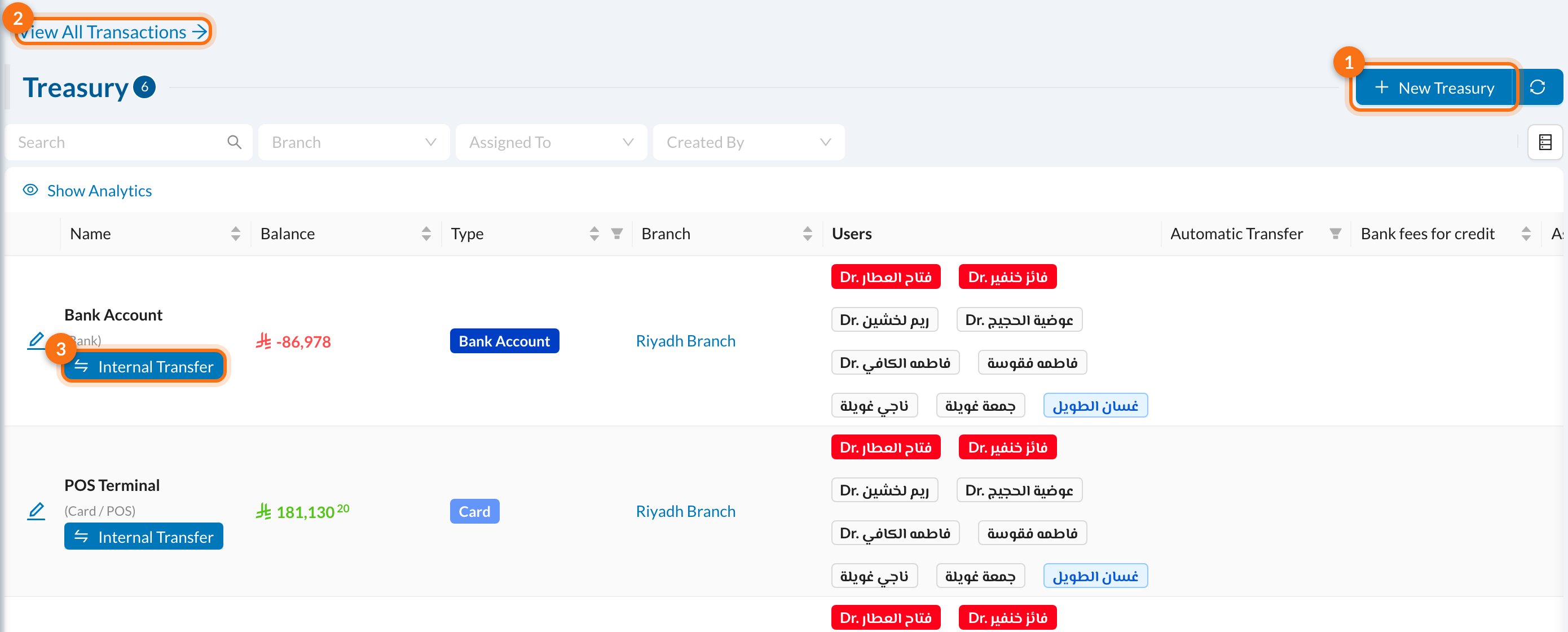 1. **New Treasury.**
2. **View All Transactions:** every movement of money, in all treasuries.
3. **Internal Transfer:** move money from this treasury to another.
The **Balance** column shows how much each treasury holds now.
## ➕ Add a treasury
Click **New Treasury**:
1. **New Treasury.**
2. **View All Transactions:** every movement of money, in all treasuries.
3. **Internal Transfer:** move money from this treasury to another.
The **Balance** column shows how much each treasury holds now.
## ➕ Add a treasury
Click **New Treasury**:
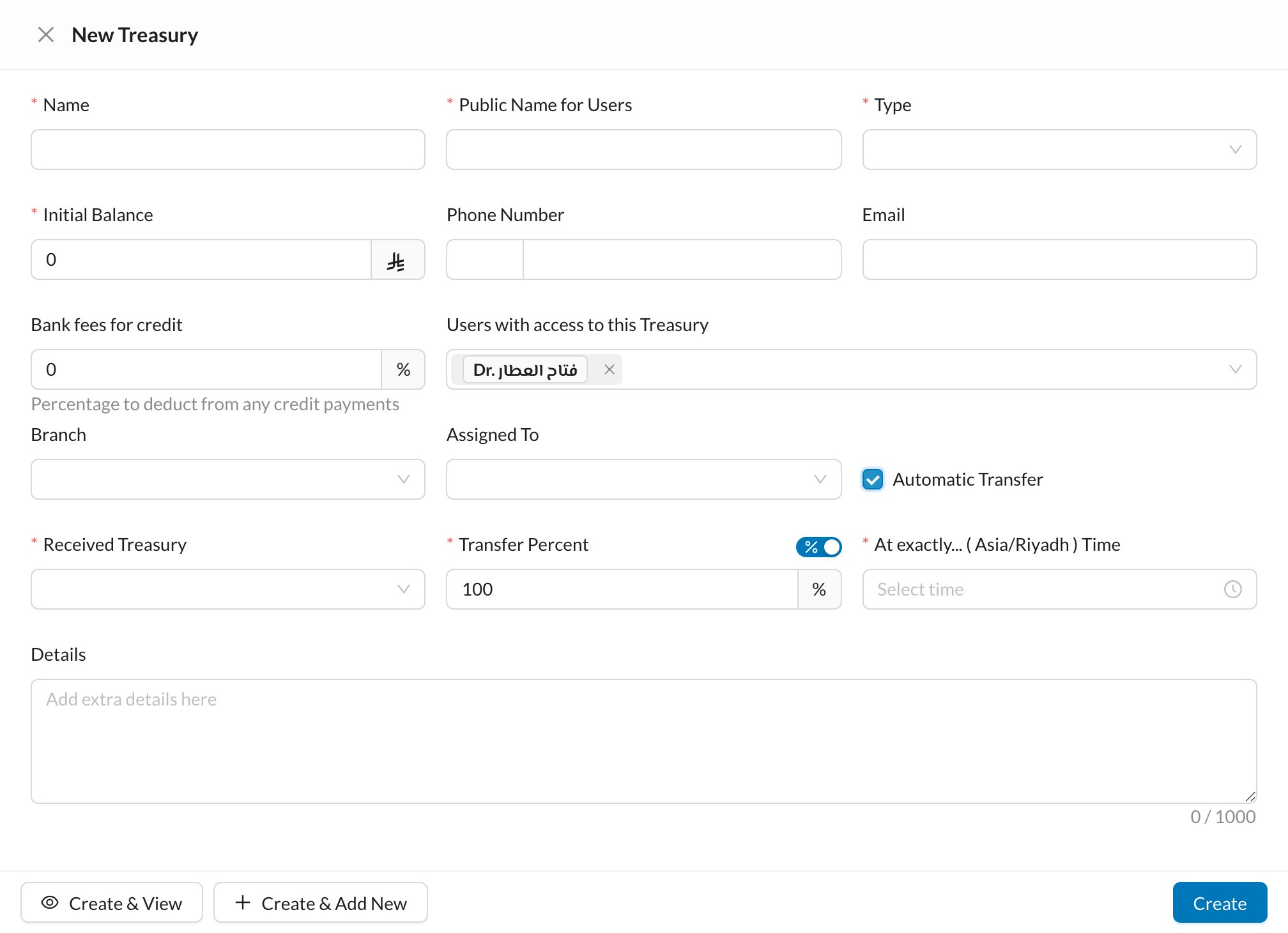 * **Name** and **Public Name for Users** (what users see when choosing a treasury).
* **Type**: Cash, Bank Account, Card, Money Safe and so on.
* **Initial Balance**: the money already in it. It can only be set when creating the treasury.
* **Bank fees for credit**: a percentage taken off card payments, for card terminals.
* **Users with access to this Treasury**, and the **Branch**.
### Automatic transfer
Tick **Automatic Transfer** to move money to another treasury every day, for example from the cash drawer to the safe. Choose the **Received Treasury**, the **Transfer Percent** (or switch to an amount to keep in the drawer), and the time.
Which treasury each payment type uses by default is set in the branch settings, so users don't have to choose it every time.
## 🏦 A treasury's page
Click a treasury to open its page:
* **Name** and **Public Name for Users** (what users see when choosing a treasury).
* **Type**: Cash, Bank Account, Card, Money Safe and so on.
* **Initial Balance**: the money already in it. It can only be set when creating the treasury.
* **Bank fees for credit**: a percentage taken off card payments, for card terminals.
* **Users with access to this Treasury**, and the **Branch**.
### Automatic transfer
Tick **Automatic Transfer** to move money to another treasury every day, for example from the cash drawer to the safe. Choose the **Received Treasury**, the **Transfer Percent** (or switch to an amount to keep in the drawer), and the time.
Which treasury each payment type uses by default is set in the branch settings, so users don't have to choose it every time.
## 🏦 A treasury's page
Click a treasury to open its page:
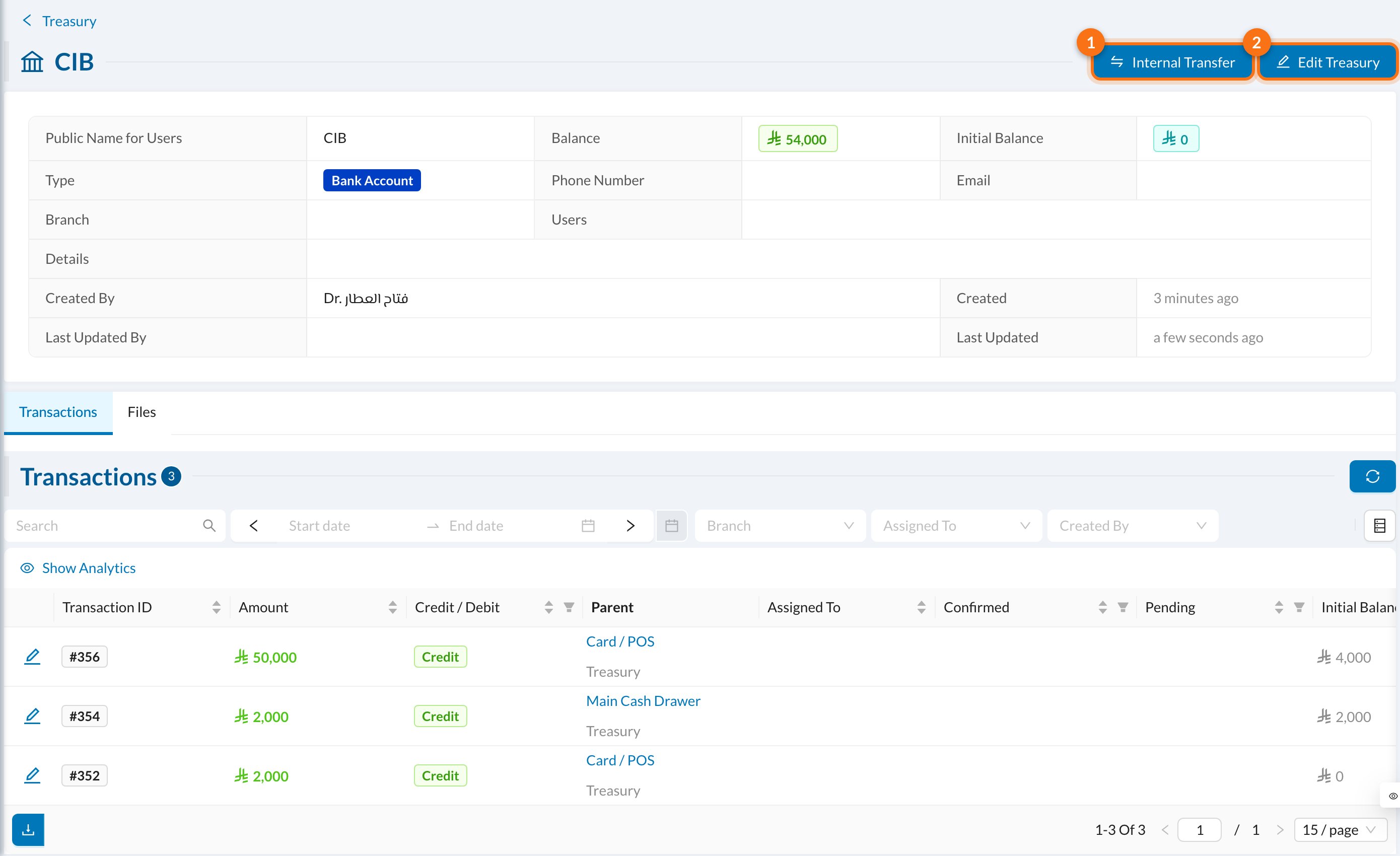 1. **Internal Transfer:** move money to another treasury.
2. **Edit Treasury.**
It shows the treasury's details, its current **Balance** and **Initial Balance**, and its **Transactions** and **Files**. Pending transfers are confirmed from the **Transactions** tab.
## 🔄 Move money between treasuries
Click **Internal Transfer** on a treasury:
1. **Internal Transfer:** move money to another treasury.
2. **Edit Treasury.**
It shows the treasury's details, its current **Balance** and **Initial Balance**, and its **Transactions** and **Files**. Pending transfers are confirmed from the **Transactions** tab.
## 🔄 Move money between treasuries
Click **Internal Transfer** on a treasury:
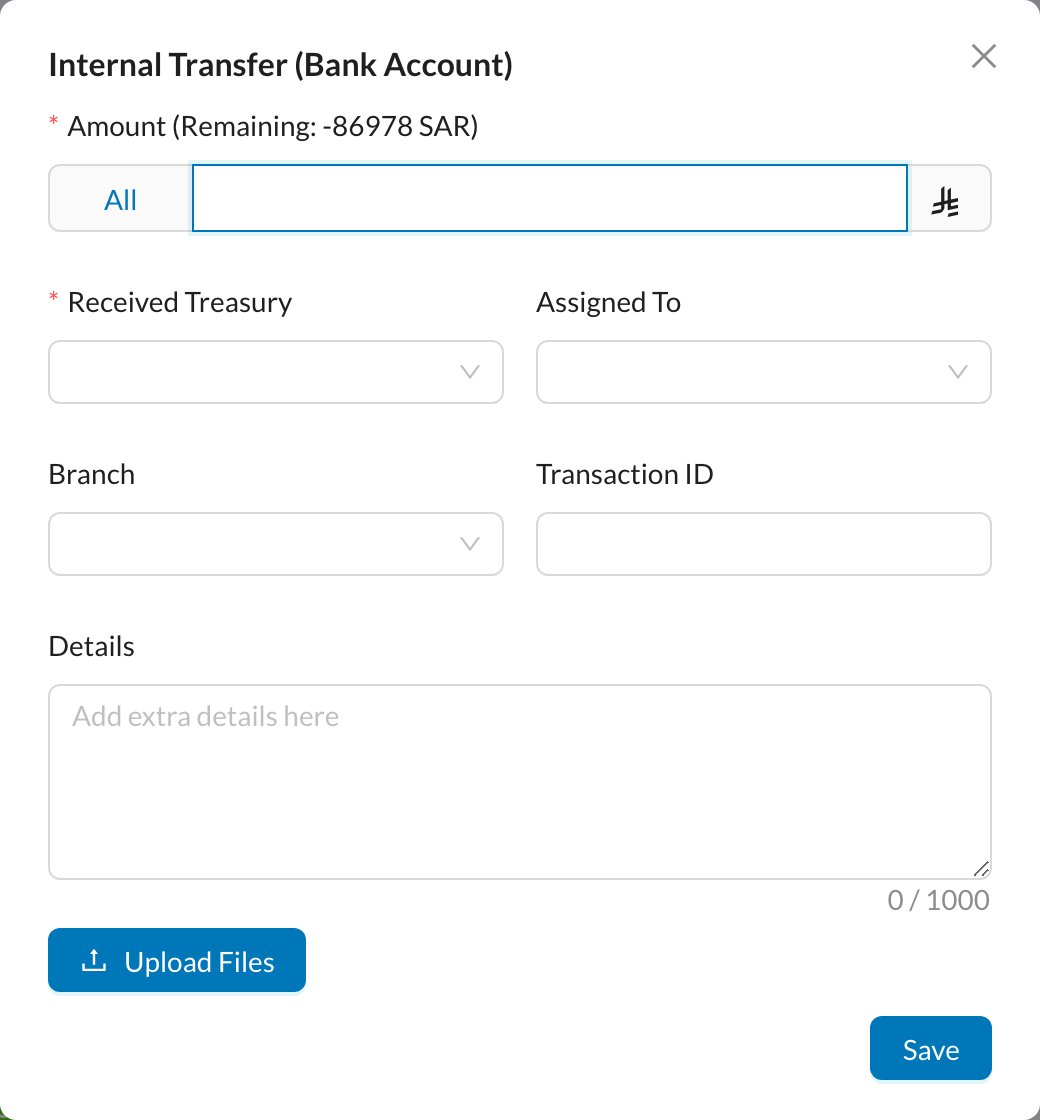 Enter the **Amount** (or click **All**), choose the **Received Treasury**, and click **Save**. If you choose a user in **Assigned To**, the money shows as pending until that user clicks **Confirm Receiving**.
## 📜 Transactions
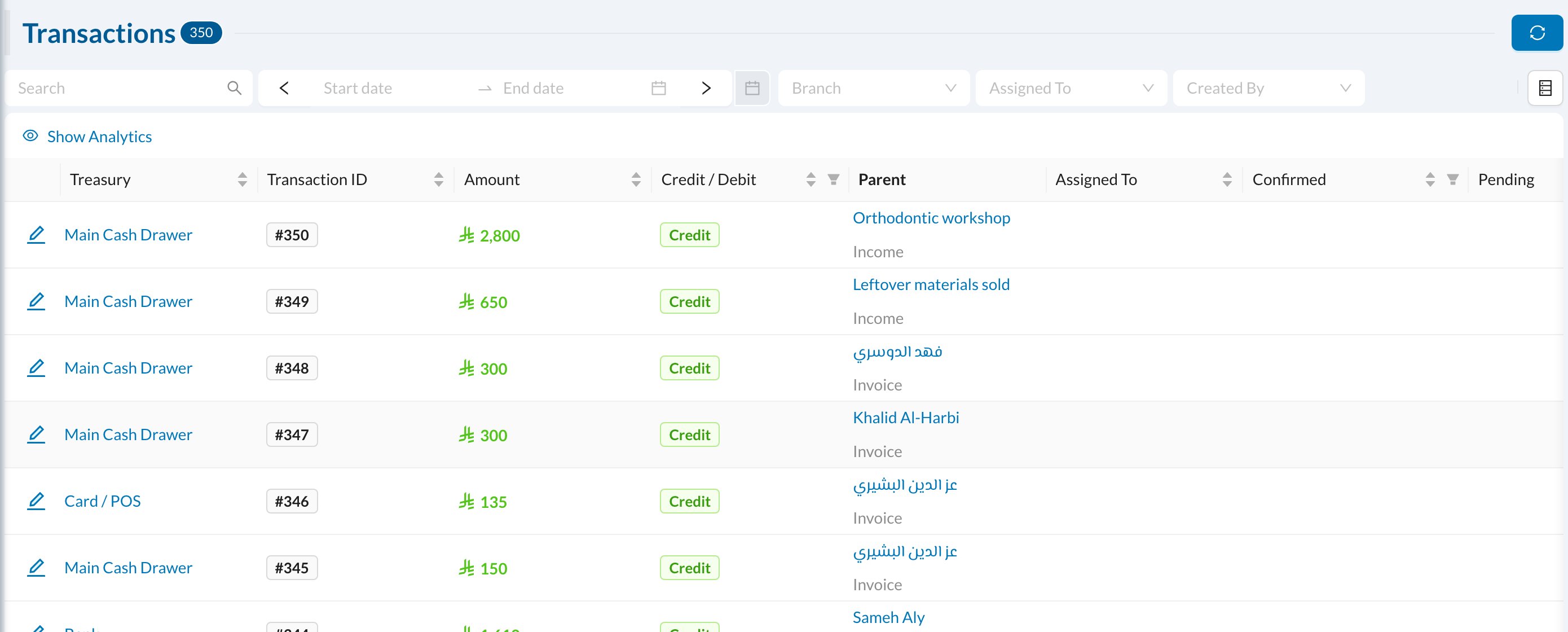
**View All Transactions** lists every movement with its treasury, amount, **Credit / Debit**, and what it came from (an invoice payment, expense, income or transfer):
Enter the **Amount** (or click **All**), choose the **Received Treasury**, and click **Save**. If you choose a user in **Assigned To**, the money shows as pending until that user clicks **Confirm Receiving**.
## 📜 Transactions
**View All Transactions** lists every movement with its treasury, amount, **Credit / Debit**, and what it came from (an invoice payment, expense, income or transfer):
 A treasury balance can't go below zero with a transfer. If a balance looks wrong, check its transactions for payments recorded in the wrong treasury.