> ## Documentation Index
> Fetch the complete documentation index at: https://docs.dentolize.com/llms.txt
> Use this file to discover all available pages before exploring further.
# Insurance claims
> Follow up what insurance companies owe you, and mark insurance payments as claimed when they pay.
When an invoice has an insurance share, an **Insurance** payment is created for it automatically, marked as **unclaimed**. When the insurance company pays you, mark it as **claimed**.
## 📋 See what each company owes
Open the insurance company (**Associates → Insurance Companies**) and go to the **Payments** tab:
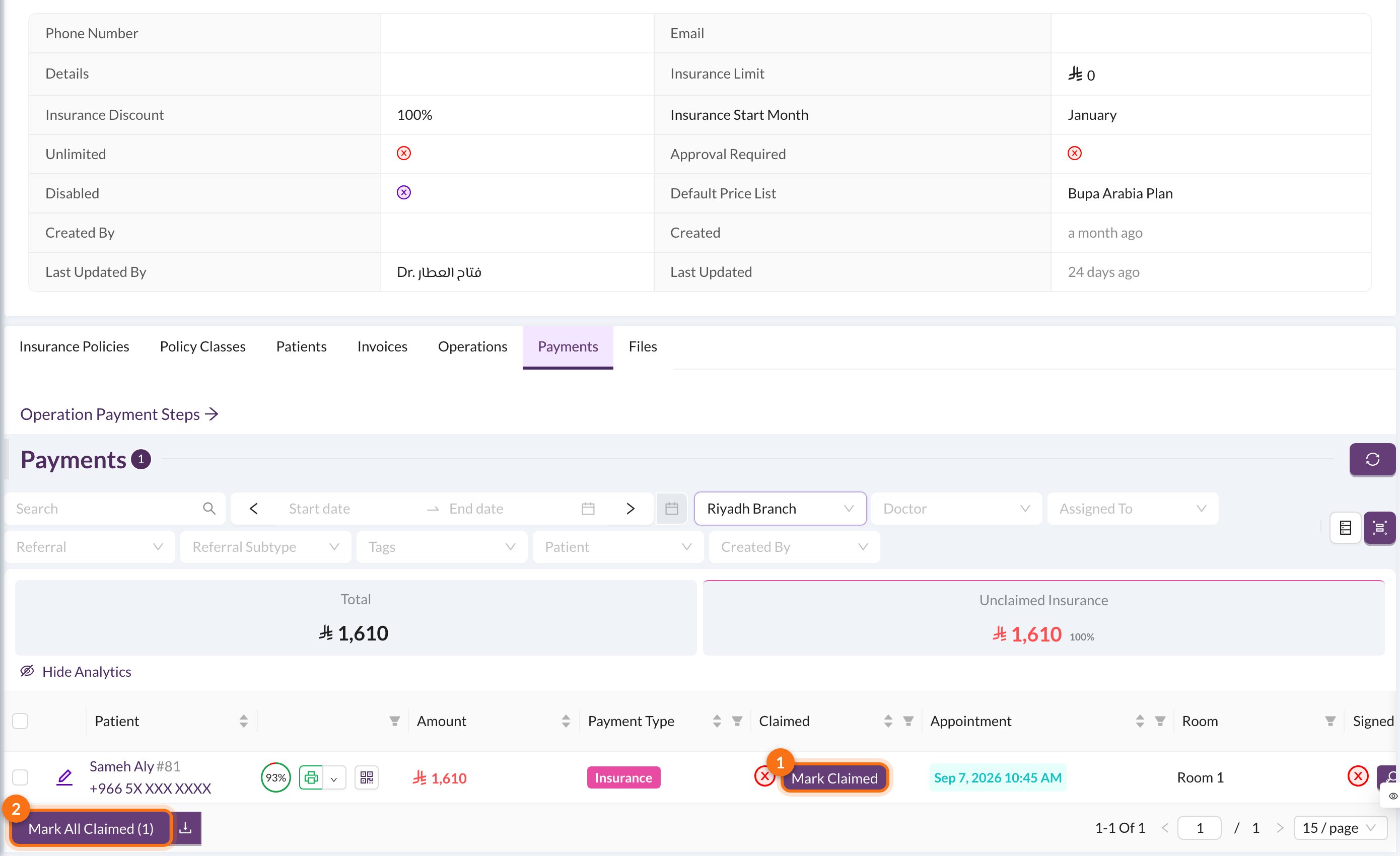 **Show Analytics** shows the **Unclaimed Insurance** (still owed) and **Claimed Insurance** (paid).
1. **Mark Claimed:** mark one payment as claimed.
2. **Mark All Claimed:** mark every payment in the list as claimed. Filter the list first, for example by date, to match the company's statement.
You can also follow all insurance payments from **Finances → Payments**: filter by **Insurance Company** and use the **Unclaimed Insurance** card. See [Payments](/en/finances/payments).
A doctor's percentage from an insurance payment is only counted once the payment is claimed. If a claim was marked by mistake, click **Mark Unclaimed** on the payment.
**Show Analytics** shows the **Unclaimed Insurance** (still owed) and **Claimed Insurance** (paid).
1. **Mark Claimed:** mark one payment as claimed.
2. **Mark All Claimed:** mark every payment in the list as claimed. Filter the list first, for example by date, to match the company's statement.
You can also follow all insurance payments from **Finances → Payments**: filter by **Insurance Company** and use the **Unclaimed Insurance** card. See [Payments](/en/finances/payments).
A doctor's percentage from an insurance payment is only counted once the payment is claimed. If a claim was marked by mistake, click **Mark Unclaimed** on the payment.