> ## Documentation Index
> Fetch the complete documentation index at: https://docs.dentolize.com/llms.txt
> Use this file to discover all available pages before exploring further.
# Messages log
> See every SMS and WhatsApp message sent to patients, resend failed ones and cancel pending ones.
Go to **Logs → Communications**:
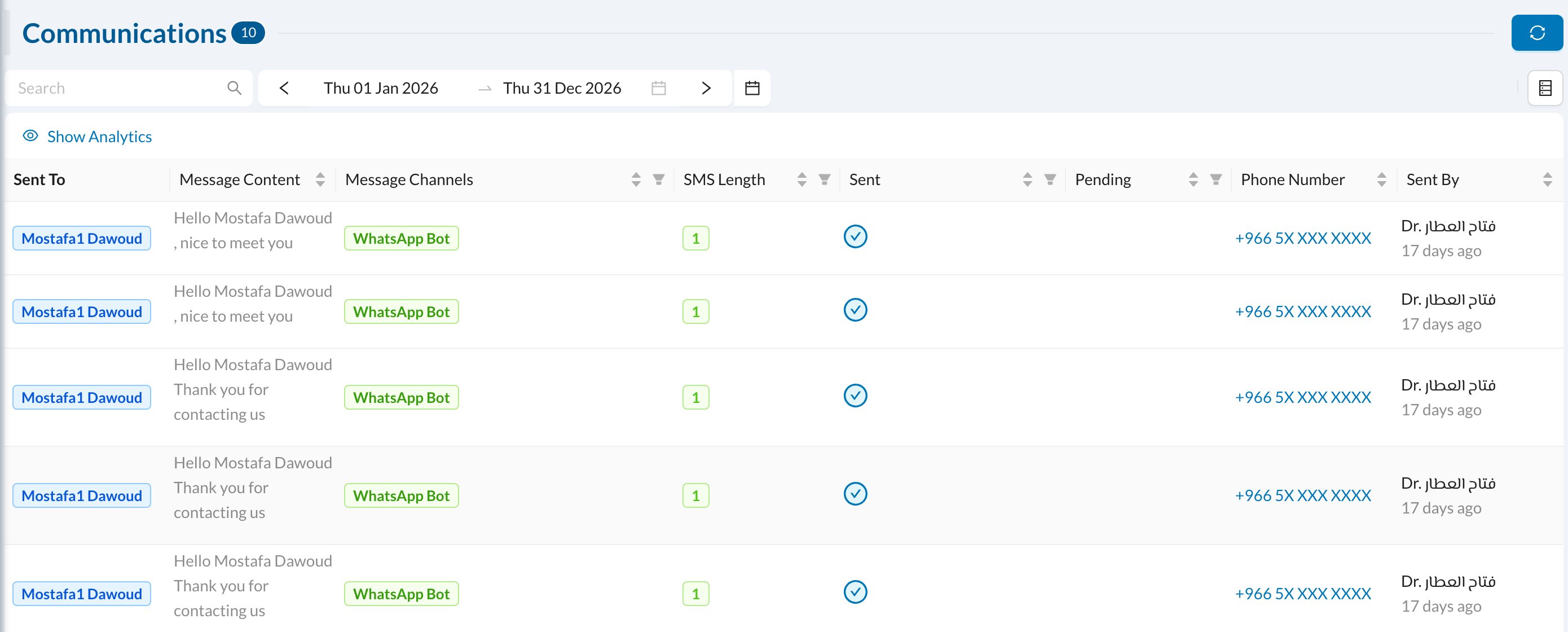 Each message shows who it was sent to, its content, the **Message Channels** (SMS or WhatsApp), the **SMS Length** (how many SMS it used), whether it was **Sent** or is still **Pending**, and who sent it.
* **Search** by patient or user name, and filter by channel or date.
* **Resend** a message that failed.
* **Cancel** a pending (scheduled) message before it goes out, for example a reminder for an appointment that was moved.
Messages can also be seen per patient, on the patient's page. For message balance and settings, see [SMS](/en/integrations/sms) and [WhatsApp](/en/integrations/whatsapp).
Each message shows who it was sent to, its content, the **Message Channels** (SMS or WhatsApp), the **SMS Length** (how many SMS it used), whether it was **Sent** or is still **Pending**, and who sent it.
* **Search** by patient or user name, and filter by channel or date.
* **Resend** a message that failed.
* **Cancel** a pending (scheduled) message before it goes out, for example a reminder for an appointment that was moved.
Messages can also be seen per patient, on the patient's page. For message balance and settings, see [SMS](/en/integrations/sms) and [WhatsApp](/en/integrations/whatsapp).