> ## Documentation Index
> Fetch the complete documentation index at: https://docs.dentolize.com/llms.txt
> Use this file to discover all available pages before exploring further.
# Logs overview
> What each log in the Logs menu lists, and how to search and filter them.
The **Logs** menu lists everything recorded in the clinic, so you can look back at any appointment, treatment, message or change. You only see the logs your permissions allow.
## 🔎 Using a log
Every log works the same way:
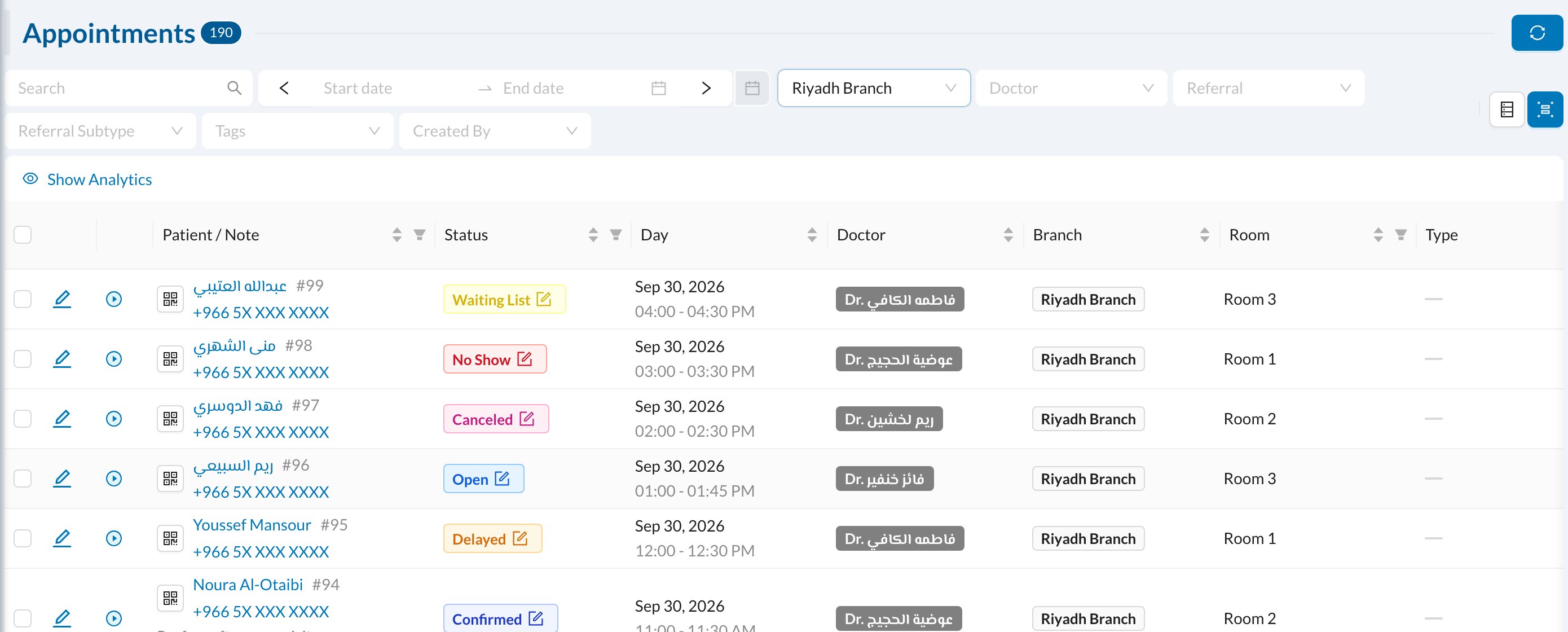 * **Search** and a **date range** at the top, plus filters such as branch, doctor, user or tags.
* Click a column title to sort, or its filter icon to filter by it.
* **Show Analytics** shows totals for what's listed.
* Click a row to open it. The download button at the bottom exports the list.
## 📚 What each log lists
| Log | What it lists |
| - | - |
| **Appointments** | Every appointment, with its status, doctor, waiting time, payments and feedback |
| **Operations** | Every treatment done, with prices, discounts, paid and remaining amounts, and insurance approval |
| **Attendance** | Staff clock-in and clock-out records (see [Attendance](/en/start/attendance)) |
| **Prescriptions** | Every prescription, with its medications |
| **Quotations** | Treatment quotations, and whether they were signed or turned into invoices |
| **Patient Forms** | Consent and custom forms, and whether they're signed |
| **Communications** | Every SMS and WhatsApp message (see [Messages log](/en/logs/communications)) |
| **Feedback** | Patients' ratings after their visits |
| **Notes** | Notes and internal messages between users |
| **Patient Links** | Self-registration links and QR codes, and how many patients used them |
| **Tasks** | Tasks assigned to staff (see [Tasks](/en/logs/tasks)) |
| **Encounters** | Clinical encounter records, when encounters are enabled |
| **Medical Logs** | Recorded medical values |
| **Files** | Every uploaded file |
| **Salary Hub** | Bonuses, deductions and doctors' percentages (see [Salary Hub](/en/logs/salary-hub)) |
| **Points** | Patients' loyalty points |
| **Online Payments** | Payments made by payment link, with their status |
| **User Actions**, **Duplicate Patients**, **Archived Patients**, **Deleted Records** | Checking changes and patient records (see [Audit and patient records](/en/logs/audit)) |
The **Operations** log is the most detailed view of treatments:
* **Search** and a **date range** at the top, plus filters such as branch, doctor, user or tags.
* Click a column title to sort, or its filter icon to filter by it.
* **Show Analytics** shows totals for what's listed.
* Click a row to open it. The download button at the bottom exports the list.
## 📚 What each log lists
| Log | What it lists |
| - | - |
| **Appointments** | Every appointment, with its status, doctor, waiting time, payments and feedback |
| **Operations** | Every treatment done, with prices, discounts, paid and remaining amounts, and insurance approval |
| **Attendance** | Staff clock-in and clock-out records (see [Attendance](/en/start/attendance)) |
| **Prescriptions** | Every prescription, with its medications |
| **Quotations** | Treatment quotations, and whether they were signed or turned into invoices |
| **Patient Forms** | Consent and custom forms, and whether they're signed |
| **Communications** | Every SMS and WhatsApp message (see [Messages log](/en/logs/communications)) |
| **Feedback** | Patients' ratings after their visits |
| **Notes** | Notes and internal messages between users |
| **Patient Links** | Self-registration links and QR codes, and how many patients used them |
| **Tasks** | Tasks assigned to staff (see [Tasks](/en/logs/tasks)) |
| **Encounters** | Clinical encounter records, when encounters are enabled |
| **Medical Logs** | Recorded medical values |
| **Files** | Every uploaded file |
| **Salary Hub** | Bonuses, deductions and doctors' percentages (see [Salary Hub](/en/logs/salary-hub)) |
| **Points** | Patients' loyalty points |
| **Online Payments** | Payments made by payment link, with their status |
| **User Actions**, **Duplicate Patients**, **Archived Patients**, **Deleted Records** | Checking changes and patient records (see [Audit and patient records](/en/logs/audit)) |
The **Operations** log is the most detailed view of treatments:
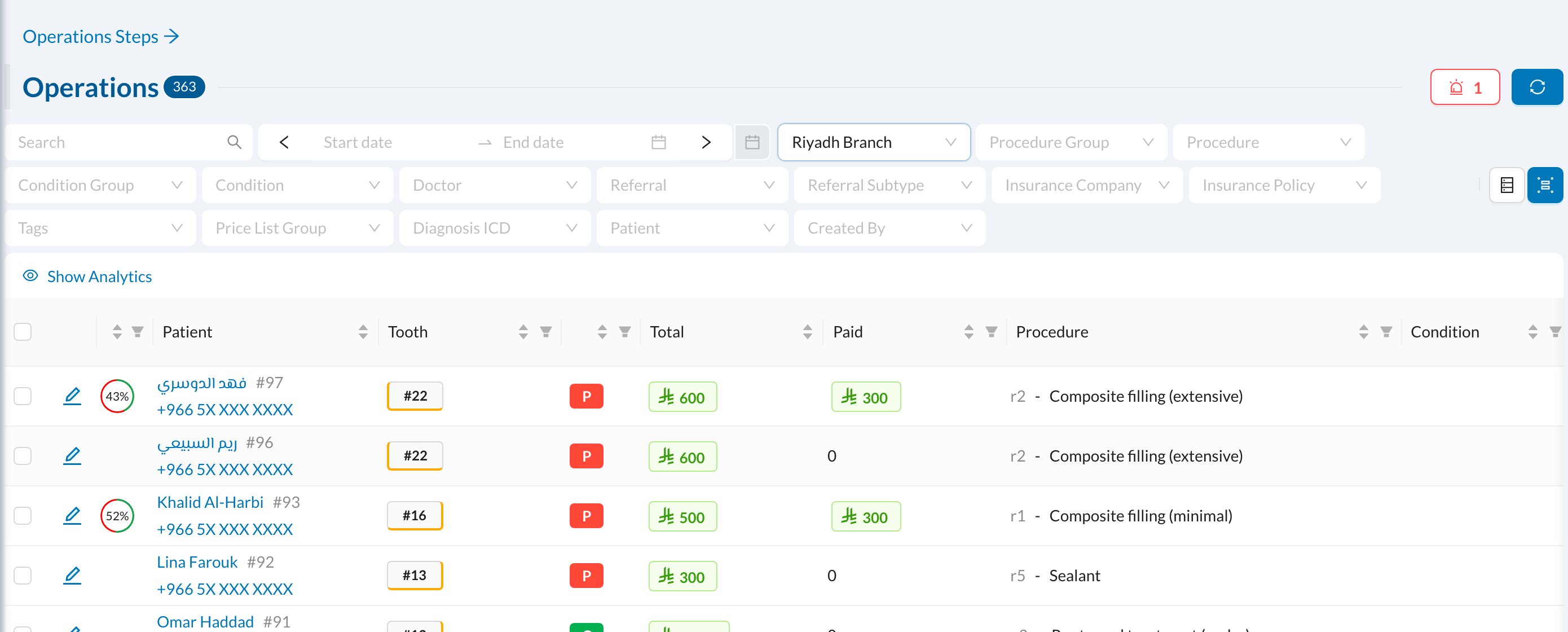 **Operations Steps** at the top of the Operations log lists treatments done in steps. The treasury **Transactions** log is opened from [Treasury](/en/finances/treasury).