

POST request with the event data to the URL you choose.
Use webhooks to sync data with an ERP or accounting system, a data warehouse, or an automation tool such as Make, Zapier or n8n.
Set up webhooks
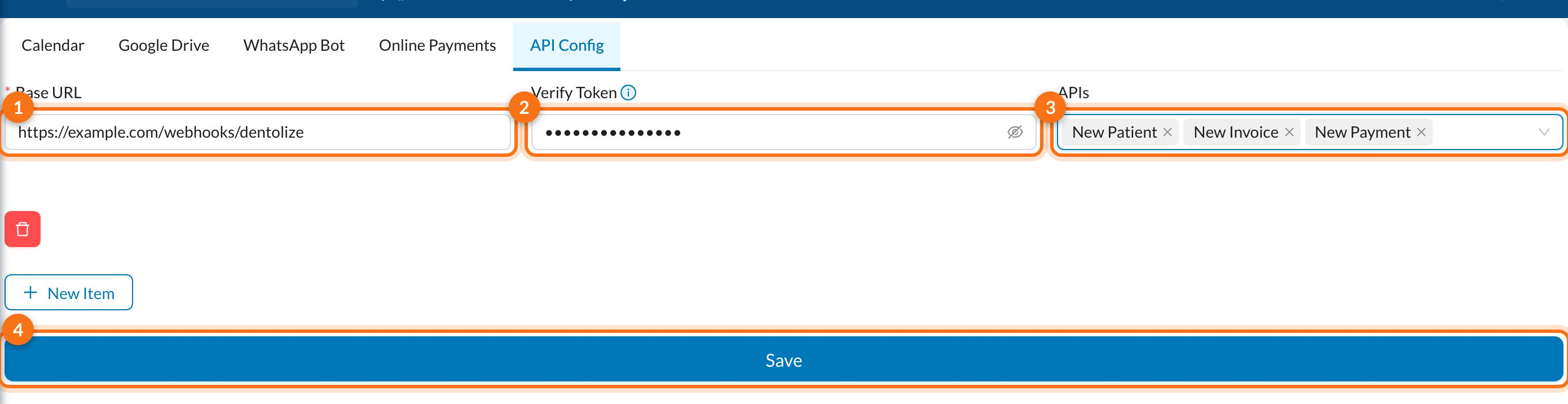
Open Settings → Integrations → API Config: For each endpoint, fill in:
Click New Item to add an endpoint, fill in the Base URL (1), the optional Verify Token (2) and the APIs to send (3), then click Save (4). You can add more than one endpoint, each with its own events.
API Config is visible to users with full permissions only, and only when the API feature is enabled for your account. If you don’t see it, contact Dentolize support.
Events
Request format
Every request is aPOST with a JSON body. The body always includes the payload version and the event type, followed by the event fields described on each event page:
Your endpoint should respond within 5 seconds. Failed or slow deliveries are not retried, so return a
2xx response quickly and process the data in the background.
Verify requests
If you set a Verify Token, each request is signed with an HMAC SHA-256 of the raw request body, using the token as the key. Compute the same signature on your side and compare it with theX-Hub-Signature-256 header before trusting the data.