

1
Open Procedures and Prices
Go to Settings → Procedures and Prices and click the group tab the service belongs to (Restoration, Endo…). To add a new group, click +.
2
Click New Field
It’s at the bottom of the group.
3
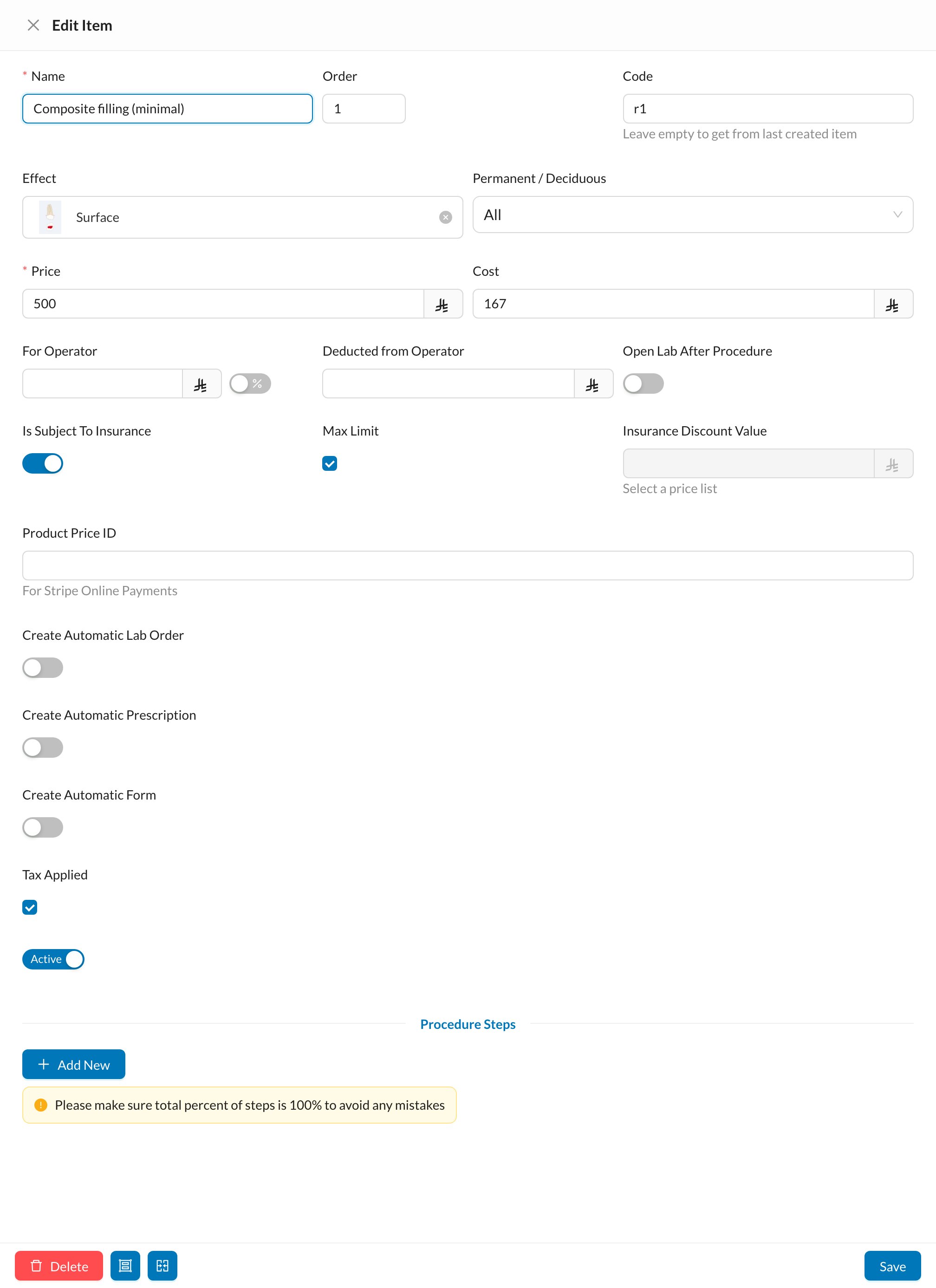
Fill in the procedure
Enter the Name and Price. Leave Code empty to continue from the last code. On the dental chart, choose the Effect (how it’s drawn on the tooth).
4
Optional: the doctor's share
Set For Operator (an amount or a %) if this procedure has its own doctor share. Leave it empty to use the doctor’s general percentage.
5
Save
The procedure now appears in the patient’s Chart under that group.
Only users with Procedures and Prices → Add New on the Practice Settings tab of their permission group can do this. Owners have it.
Still stuck?
Send us a message in System Chat inside Dentolize with a screenshot, and tell us which step didn’t work. Tip: next time, search this site first. Most answers take less than a minute.