

🧩 Basic Requirements Before Activation
Before starting, make sure you have:- Mobile number dedicated to the WhatsApp Bot
The number must be on a real phone, as a verification SMS will be sent during activation. - Active Meta Business Account
Login must be via a Facebook account only (Instagram login is not supported). - Clinic website or official Facebook page
- Payment method (optional)
Required only if you plan to enable paid messages.
1️⃣ Log in to Meta Business
Go to:business.facebook.com Log in using the Facebook account that manages the clinic page.
2️⃣ Verify Your Business Portfolio
After logging in, all business portfolios linked to your account will appear.Select your clinic’s business portfolio. If you don’t have a portfolio, create a new one by clicking:
Create a Business Portfolio
.png?fit=max&auto=format&n=Kgmrwskx-GMAqMHx&q=85&s=d313bf6921854c402ef233e1ac79a98f "2(2) Pn")
3️⃣ Review Portfolio Information
Go to:Settings → Business Info
.png?fit=max&auto=format&n=Kgmrwskx-GMAqMHx&q=85&s=96eb4cd536bbfd3b636107f533cdfac8 "2(3) Pn")
- Legal clinic name
- Address
- Clinic phone number
- Clinic website or Facebook page
If any information is incorrect:
Click Edit, correct the details, then click Save
.png?fit=max&auto=format&n=nzBtDHk7oqXu-mSg&q=85&s=5417e13f30c0eb187a5f5980ef8f78ec "2(4xcvxv) Pn")
✅ Verify Email
Scroll down and make sure your email is verified.If not, complete the verification process before proceeding.
4️⃣ Start Linking from Dentolize
Go to Dentolize → Settings → Integrations → WhatsApp Bot.Click Login with Facebook.
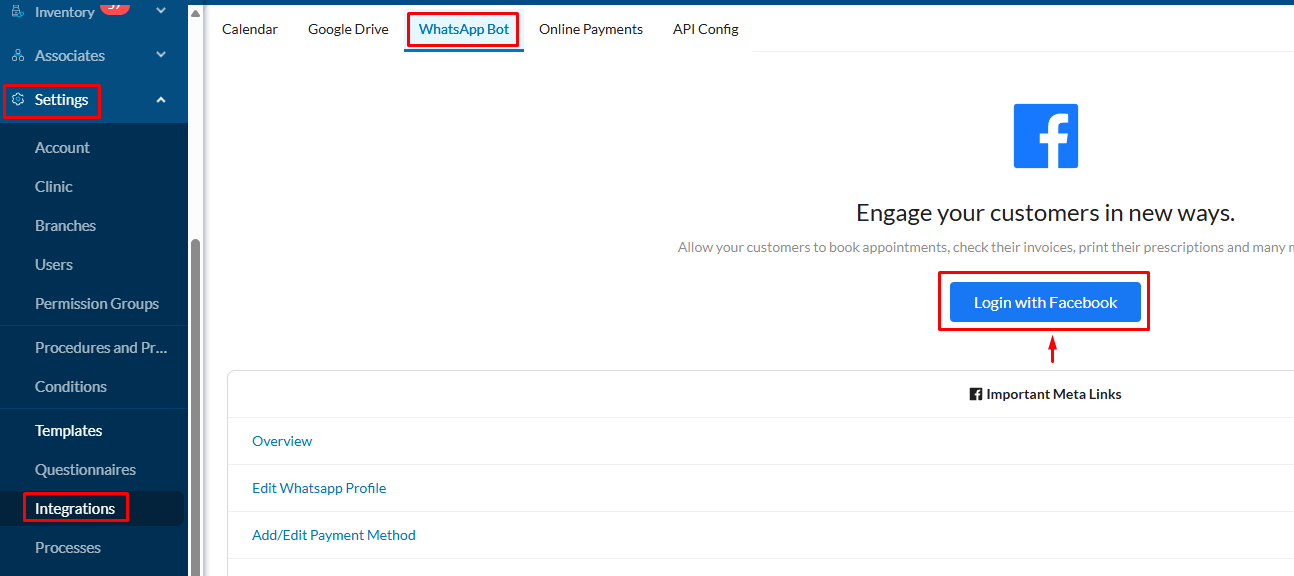
Click Get Started.
.png?fit=max&auto=format&n=Kgmrwskx-GMAqMHx&q=85&s=0e707fcf189e5a48d3bad22739bd8690 "2(5) Pn")
5️⃣ Select the Correct Business Portfolio
All business portfolios linked to your account will appear.Select your clinic’s portfolio.
Check the website below the portfolio to confirm you chose the correct one.
Then click Next.
.png?fit=max&auto=format&n=Kgmrwskx-GMAqMHx&q=85&s=73bee7b72128a4d60c201c6cca72e326 "2(6) Pn")
6️⃣ Create a WhatsApp Business Account on Meta
Make sure the first option is set to:Create a WhatsApp Business Account Click Next.
.png?fit=max&auto=format&n=Kgmrwskx-GMAqMHx&q=85&s=0c14ecddd1b47b3940b15a05f933f6ae "2(7) Pn")
- WhatsApp account name in Meta (e.g., WhatsApp Bot)
- Display Name for patients (Capitalize the first letter if in English)
- Choose category: Medical & Health
.png?fit=max&auto=format&n=Kgmrwskx-GMAqMHx&q=85&s=2166897190fd7ed69645b32558453a24 "2(8) Pn")
7️⃣ Add Your WhatsApp Bot Number
Click Add New NumberSelect your country.
Enter the phone number dedicated to the bot.
Click Next.
.png?fit=max&auto=format&n=Kgmrwskx-GMAqMHx&q=85&s=b242cc00a05d578839e71a74ea6ba190 "2(9) Pn")
8️⃣ Receive Verification Code
It may take 1–2 minutes for the SMS to arrive.If it doesn’t arrive, choose Call me to get the code via voice call.
Enter the code and click Next.
.png?fit=max&auto=format&n=Kgmrwskx-GMAqMHx&q=85&s=5a6cb0702244b8bc6ceecaf2784e8ae0 "2(10) Pn")
Verification completes within seconds.
9️⃣ Step 9: Complete Linking
After confirming your number, click Finish..png?fit=max&auto=format&n=Kgmrwskx-GMAqMHx&q=85&s=b3d8706827bca0f49aaa1366a807c42d "2(11) Pn")
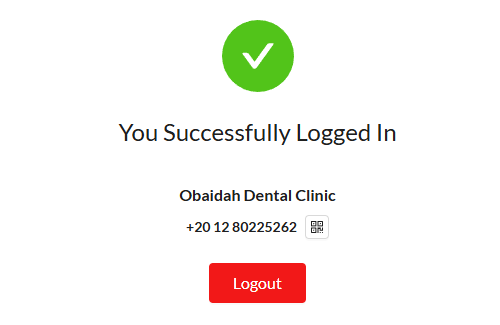
Do not click Logout. It disconnects the number, stops all automatic WhatsApp messages and deletes your WhatsApp message templates from Dentolize. To use the bot again, you have to go through Meta’s sign-up again.
⚙️ After Activation
Next, we will configure:- Detailed settings inside Dentolize
- Additional settings inside the Meta platform
❓ Frequently Asked Questions (FAQ)
Can the bot be activated on a number currently used on WhatsApp?
Can the bot be activated on a number currently used on WhatsApp?
No. The number must not be linked to any existing WhatsApp account.
If it is in use and you want to activate the bot with it, you must delete the WhatsApp account or use a new number.
If it is in use and you want to activate the bot with it, you must delete the WhatsApp account or use a new number.
Can I reply to patients manually through regular WhatsApp?
Can I reply to patients manually through regular WhatsApp?
No. All communication must be done via Dentolize web or mobile app.
Do free messages have a specific limit?
Do free messages have a specific limit?
Yes.
When a patient contacts the WhatsApp Bot number, a 24-hour free messaging window opens, which renews each time the patient starts a new conversation with the bot.
From 1 October 2026, replies are free for the first 1,000 messages per number each month, then charged by Meta.
There is a daily limit of 250 conversations if your account is new, which can be increased later by following Meta’s conditions.
When a patient contacts the WhatsApp Bot number, a 24-hour free messaging window opens, which renews each time the patient starts a new conversation with the bot.
From 1 October 2026, replies are free for the first 1,000 messages per number each month, then charged by Meta.
There is a daily limit of 250 conversations if your account is new, which can be increased later by following Meta’s conditions.
Do I need a bank card for activation?
Do I need a bank card for activation?
No — only if you want to enable paid messages.
If my WhatsApp number or Meta account gets restricted, who do I contact?
If my WhatsApp number or Meta account gets restricted, who do I contact?
Account restrictions or blocks by Meta are entirely your responsibility.
Dentolize is not responsible for any issues arising from your personal Meta account.
You should contact Meta support to resolve or lift any restrictions.
Dentolize is not responsible for any issues arising from your personal Meta account.
You should contact Meta support to resolve or lift any restrictions.